- 2×Chicken parmigiana
- 1×French fries
In kitchen
Ready
QR menu, kitchen display, floor plan and sales reports, all connected. It opens in the browser, there is nothing to install, and you can set it up in an afternoon.
We are a new product and we would rather say so. That is why the first 30 days are free, with no card, and you can walk away whenever you want, taking your setup and your data with you.
domangia is a cloud-based restaurant management system for restaurants, bars, cafés, food trucks, ice cream shops, bakeries and hotels with room service. It brings the QR digital menu, the kitchen display, the live floor plan, order taking and sales reports together on one platform. It runs in the browser —there is nothing to install— and it supports multiple locations, with each business's data isolated from the rest. And if the venue loses its internet connection, the devices keep working with each other and everything syncs on its own once the connection is back.
The problem
It is not that tools are missing. It is that each one holds a piece, and the missing piece gets filled in from memory by someone in the middle of service.
Today, nine o'clock on a Saturday
With domangia
How it works
Three steps, with nobody carrying tickets back and forth by hand.
They scan the QR code, see the menu with current prices and allergens, choose and confirm. No app to install.
≈ 2 minThe ticket lands on the display with its time, its table and its timings. The kitchen marks it ready and the floor finds out on its own.
instantlyThe bill is already built from what left the kitchen. You charge, close the table, and the sale lands in the report.
≈ 1 minThe modules
The QR menu, the floor plan, suppliers and the reports come with the base plan. The rest are subscribed separately: you pay only for what you use.
See what the base plan brings and what is subscribed separately
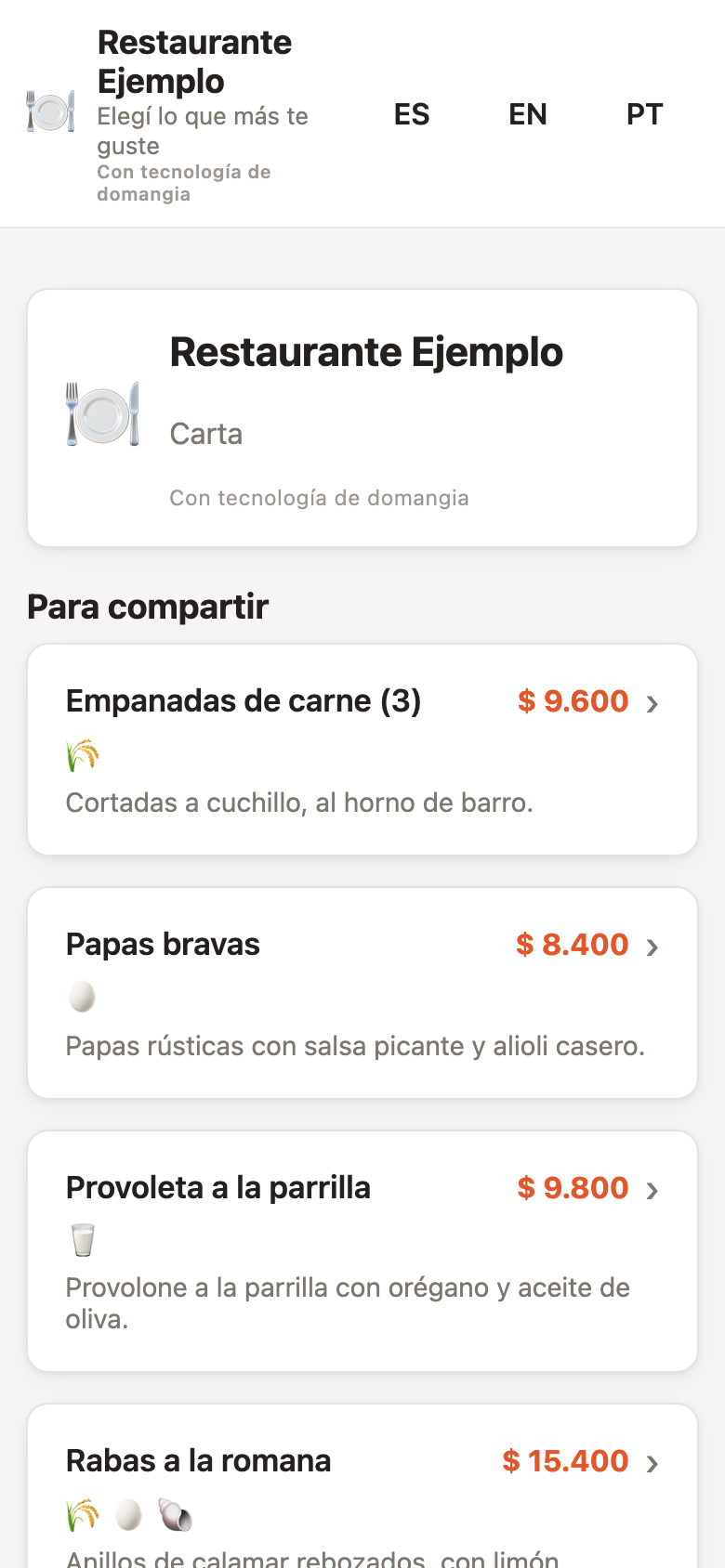
Your menu opens by scanning the QR code on the table, with photos, allergens and current prices. The guest customises, confirms, and the order goes straight into the system.
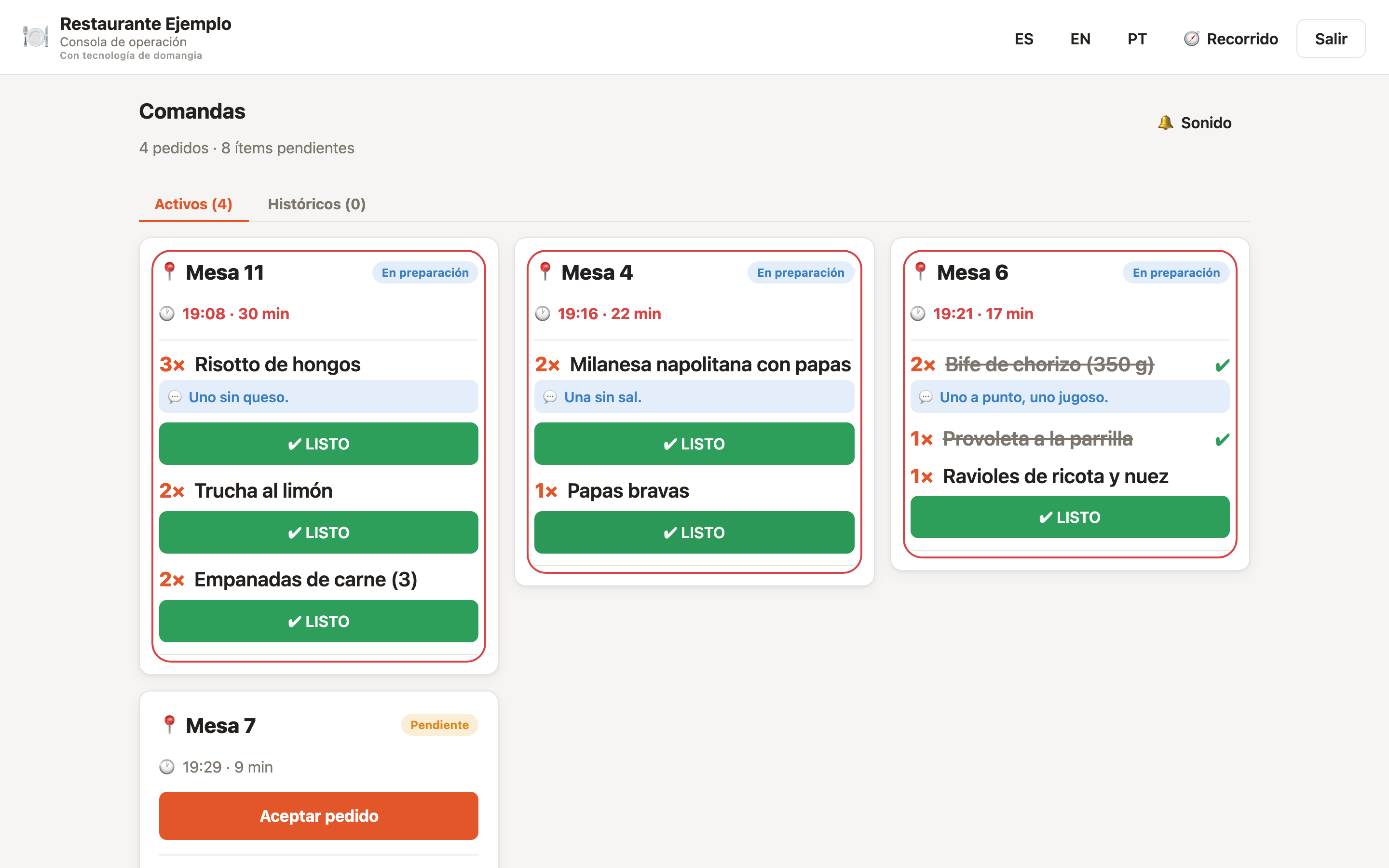
Tickets reach the kitchen display with their table, their time and per-dish timings. Mark it ready and the floor sees it instantly. Separate module
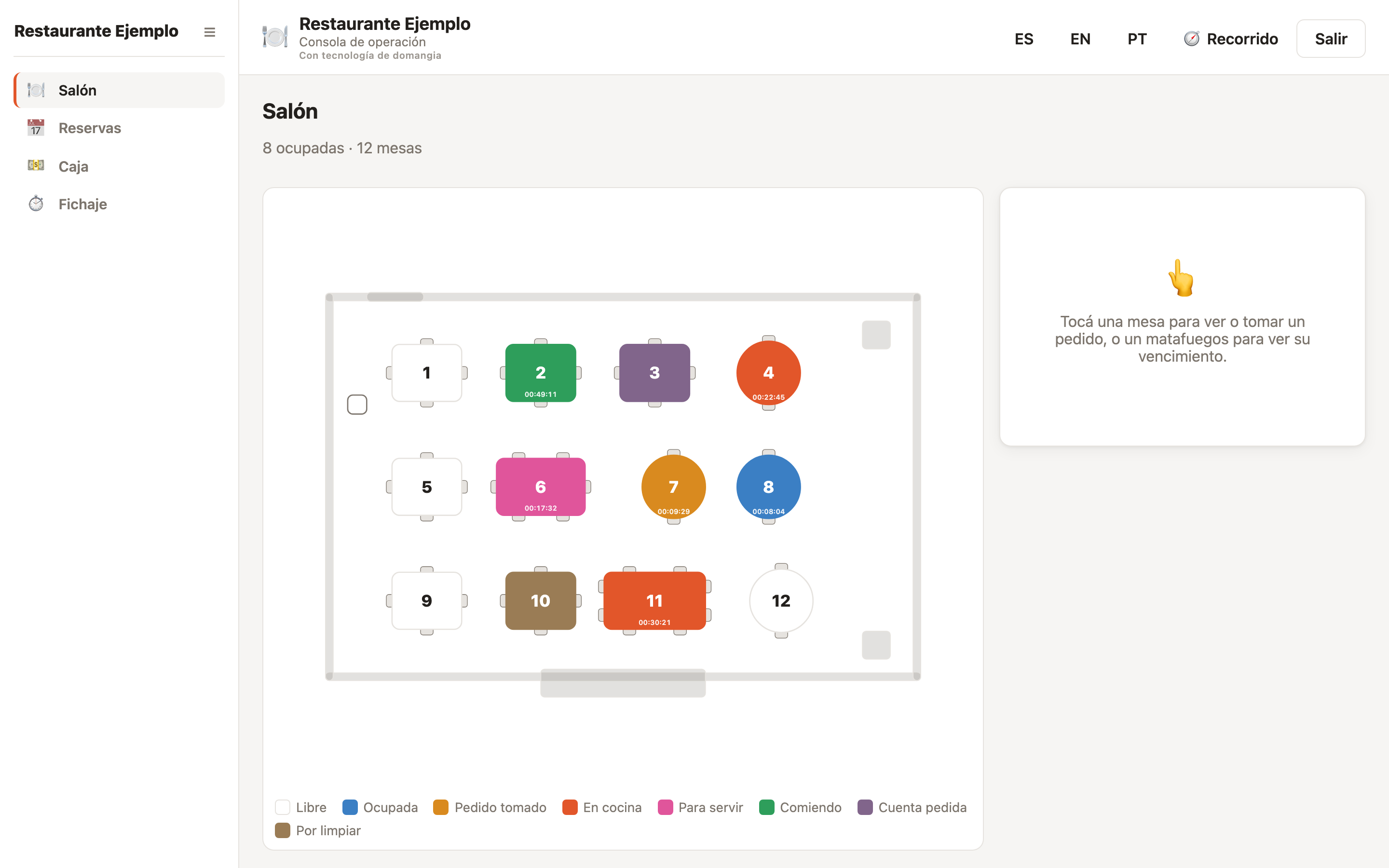
Draw your areas and tables once, then watch the real state of each one: seated, in the kitchen, ready to serve, waiting to pay.
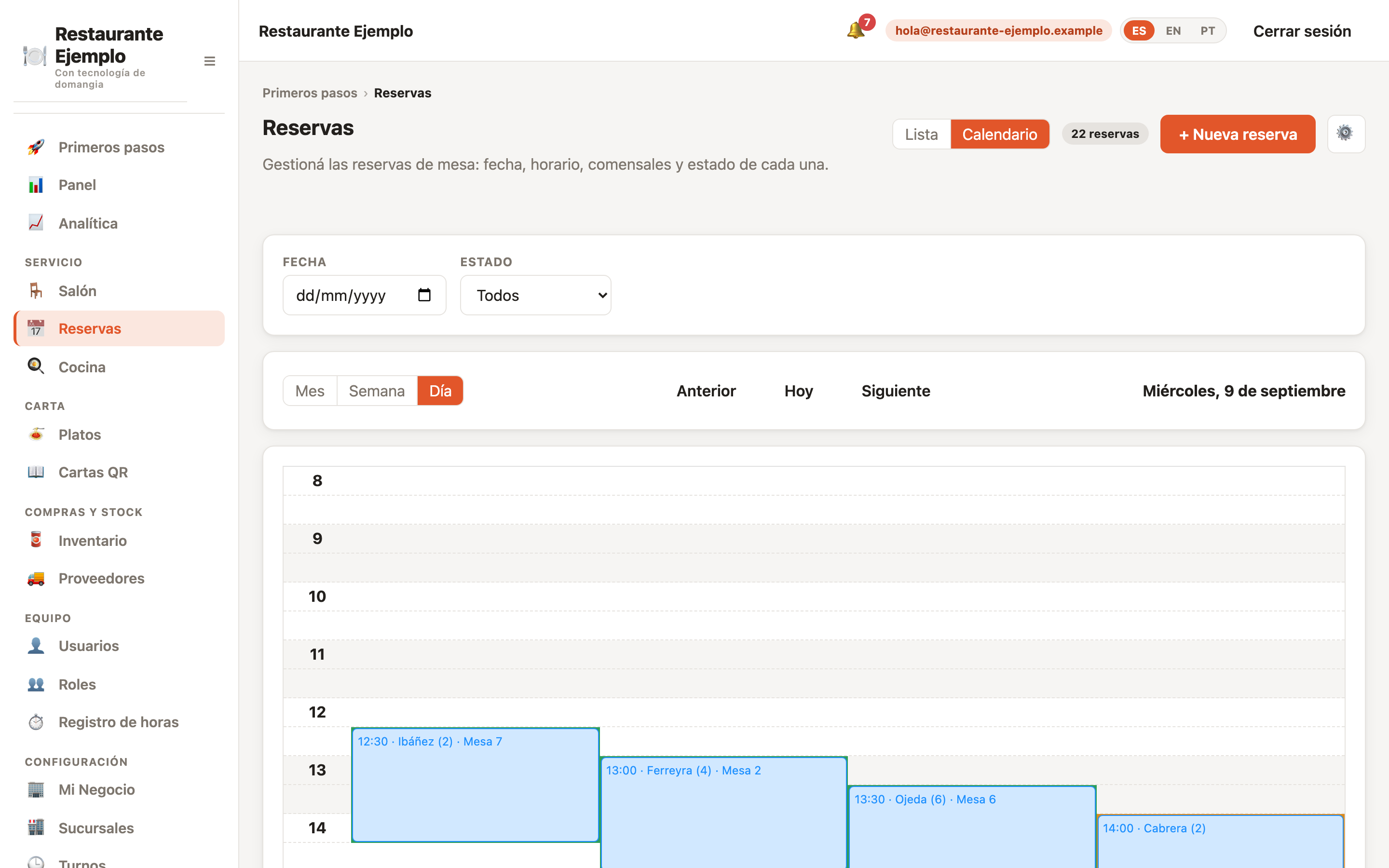
Bookings with real availability by area and time slot, so you never sell the same table twice on a Friday night. The book is kept at the venue, and each location sees its own. Separate module
Stock is deducted with every sale. Ingredients, recipes and movements in one place, with no parallel spreadsheet. Separate module
Suppliers, purchases and cost prices in the system, so a dish's cost does not depend on remembering what a kilo used to cost.
Licensing checklist by country and business type, plus risk analysis of your suppliers and your floor plan: what is missing, what is about to expire and what is worth fixing. Separate module
Sales by period, average ticket, best sellers and stock movements. The information you need to decide what to buy and what to drop.
QR menu
A code on every table and the menu opens in the guest's browser. Change a price and it is changed; run out of a dish and you pull it from your phone, in the middle of service.
Kitchen display
The ticket lands on the screen with the table, the time and what needs doing. After ten minutes it flags itself as late, so the problem shows up before the guest points it out.
Floor plan
Draw your areas, your tables and your bar with a visual editor. After that, each table's colour says what it needs: green means everything is fine, any other colour is asking for something.
Reservations
Bookings with real availability by area and time slot, so you never sell the same table twice on a Friday night. The book is kept at the venue, and each location sees its own.
Stock and supplies
Stock is deducted with every sale. Ingredients, recipes and movements in one place, with no parallel spreadsheet.
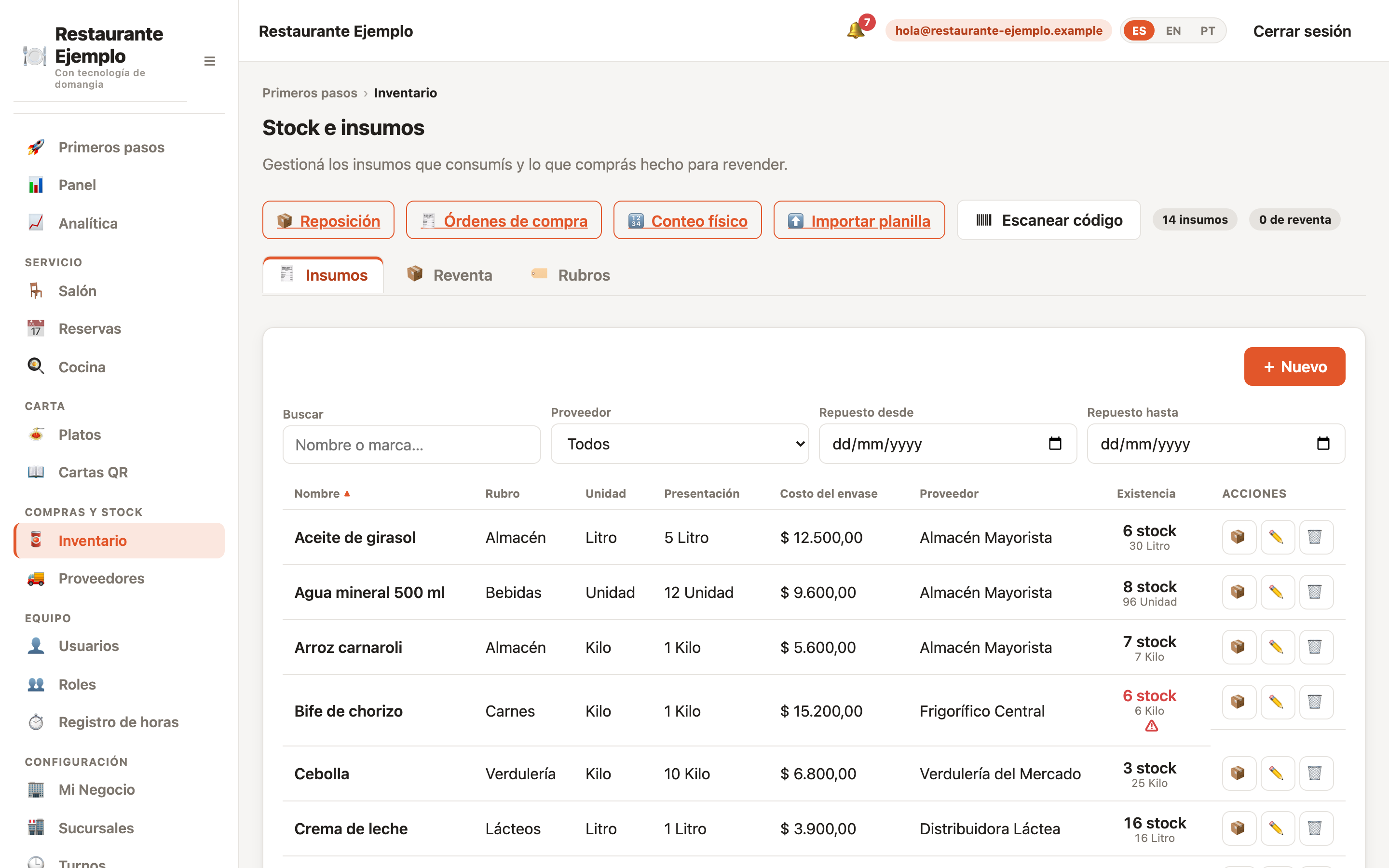
Screenshots of the product running, taken on a demo business with example data. None of them is a customer.
Connect with AI
Connect the assistant you already use and ask it, in plain language, about sales, stock, kitchen times or bookings. It is not our assistant: it is yours, looking at your live data. No other restaurant management system in the region does this.
You ask
How much did I sell this month against last month, and which dishes dropped?
It answers
It queries both periods, compares them dish by dish and gives you the total, the difference and what fell. With what is in your business right now, not the spreadsheet someone exported last week.
Never more than you can do
The assistant inherits the permissions of whoever connected it, and they are checked on every single call. Take reports away from that person tomorrow and the assistant loses them too, without anyone touching the connection.
It looks, it does not touch
Taking payment, opening or closing the till, deleting data, changing users or touching billing are out of reach for any connection, even with everything enabled. It connects to ask, not to change.
Every question is logged
Each call leaves a line with the tool, the moment and the outcome, and what was queried is not copied into any other table. Cut the connection and it stops answering at once.
It comes with the base plan: not a module, nothing to subscribe to, no extra charge.
Seven concrete differences, not adjectives.
Unlimited users
Add your whole team without paying per head, on any plan, from day one. There are no per-seat or per-device licences: the waiter's tablet, the kitchen screen and the till aren't charged separately.
All your venues, one account
Each location with its own menu, prices and floor plan, all managed from the same place. The first one comes with the base plan; every one you add has its own monthly price, with no per-terminal fee.
A base plan and the modules you add
No setup fee and no lock-in. You pay the base plan and add only the modules your operation needs; add them and drop them whenever you want.
The internet drops and you keep selling
The devices in the venue keep talking to each other even with no connection. Whatever is taken during the outage uploads on its own once the internet is back: nobody has to copy anything by hand.
You see the risk before the inspector does
We tell you which permits apply to you based on your country and the kind of place you run, warn you before anything expires, and help you check a supplier before you buy from them. It's a module on top of the base plan.
No hardware to buy
It runs on the computer, tablet or phone you already have. No terminal to buy and no cables to run.
Nothing to install
It opens in the browser. Your guests install nothing either: they scan the code on the table and that is it.
Pricing
No setup fee and no lock-in. You pay a base plan per month —which brings the whole product except the modules subscribed separately, and includes your first location— and add only the ones your operation needs.
US$ 15 the base plan, per month
Plus the modules you add, at US$ 8 – US$ 20 each per month, and US$ 5 for every location beyond the first.
The base plan, kitchen display to dispatch and the second venue.
With as many users as you need, at no charge per head.
A bakery does not operate like a bar. The system fits both.
Floor, kitchen and till looking at the same order, from starter to dessert.
High turnover and small tickets: you charge fast and the bar sees everything.
Separate tickets for bar and kitchen, with the tab open per table.
No install and no cables: it runs from a phone, wherever you park.
Flavours, sizes and toppings without the queue grinding to a halt.
Bakeries
Counter sales and pre-orders alike, with the day's stock always in view.
Hotels with room service
The order is tied to the room number and the charge builds up on its own.
Fast food
Order, kitchen and handover in minutes, with the screen keeping time.
Security and data
You are about to put your business's billing in here. This is what is on the other side.
Other restaurants use domangia and none of them can see anything of yours: not your sales, not your menu, not your suppliers. It isn't a setting someone has to switch on, and it can't be misconfigured by accident.
Everything travelling between your browser and domangia is protected. And your password isn't kept: if you forget it, you set a new one — nobody can tell you what it was, us included.
Permissions are defined per role. Servers do not reach the sales reports and cooks do not change prices, without you having to trust that nobody clicks too far.
Changes to the business are logged with who made them and when. When something does not add up, there is somewhere to look instead of reconstructing it from memory.
We run the infrastructure. There is no machine behind the counter that somebody has to patch, back up or reboot on a Saturday.
It is a cloud-based management system for food businesses. It brings the QR menu, the kitchen display, the floor plan, order taking and sales reports together on one platform, so information is not duplicated across disconnected tools.
Restaurants, bars and breweries, cafés, food trucks, ice cream shops, bakeries, fast food and hotels with room service. It works for table service and counter service alike, and for hybrid operations too.
You start with 30 days free and no credit card. After that you pay a base plan per month, which brings the whole product except the modules subscribed separately and includes your first location, plus whichever modules you subscribe to and any locations beyond the first. Prices are in US dollars and there is no setup fee and no minimum term.
No. domangia runs in the browser, on the computer, tablet or phone you already have. Your guests install nothing either: they scan the QR code on the table and the menu opens in their browser.
Yes. You manage all your locations from a single account, each with its own menu, prices, floor plan and settings, and reports can be viewed per location. The first one is included in the base plan; every location you add has its own monthly price.
The system keeps working. The devices in the venue talk to each other without going through the internet, so orders keep being taken and the kitchen keeps seeing them. Whatever was done during the outage syncs on its own once the connection is back, with nobody having to enter it again.
The platform is available in Spanish, English and Portuguese. Dates, amounts and currency are shown using the conventions of the business's country, so in Argentina it reads like Argentina and in Brazil like Brazil.
Yes. Each business is an isolated tenant: the separation is enforced in the database itself, not just on screen, so no query can return another business's information.
Updated on
30 days with the full platform. Load your menu, lay out your floor and run a real service before you decide.
No card required, no lock-in, and you can cancel whenever you want.